Introduction
Mimicrab is a high-performance, developer-friendly mock server built in Rust. It allows you to quickly create, manage, and test HTTP mocks with advanced features like request matching, dynamic Lua scripting, and response templating.
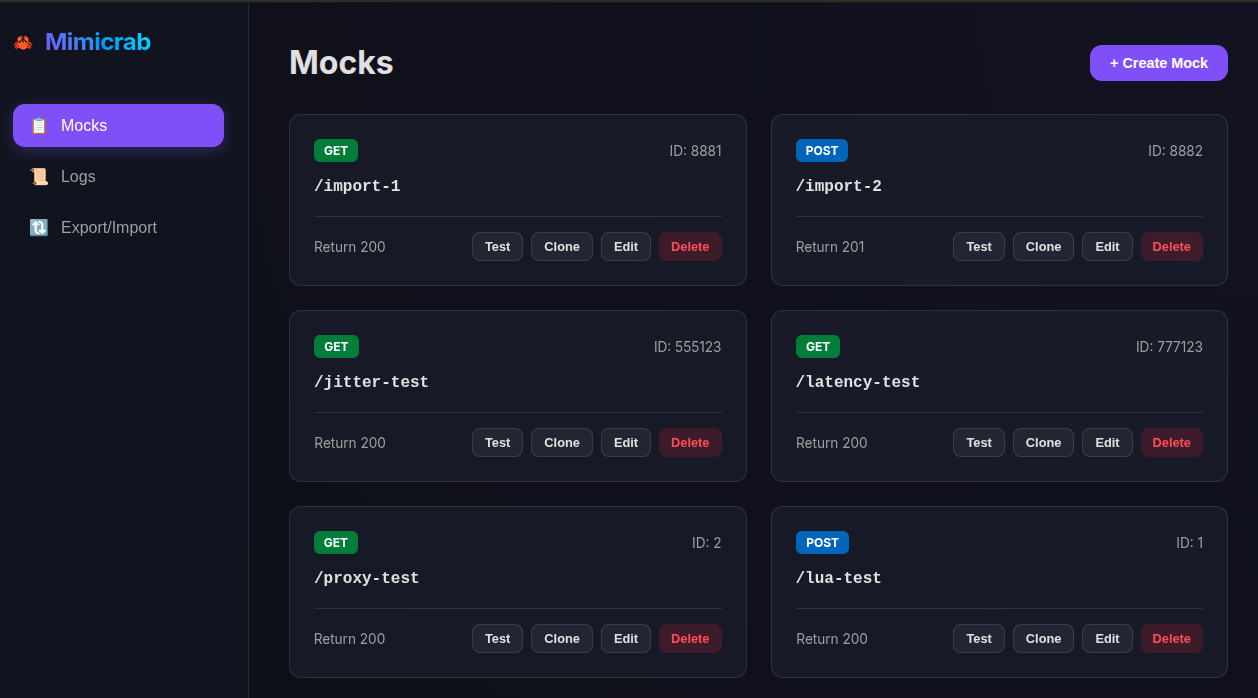
Why Mimicrab?
- Easy to use: Intuitive dashboard for managing mocks.
- Dynamic: Generate responses programmatically using Lua.
- Flexible Matching: Match requests by method, path, headers, and body.
- Lightweight: Low memory footprint and fast startup times.
- Production Ready: Supports Docker and Kubernetes deployment.
Getting Started
Welcome to Mimicrab! This section will help you set up the environment and create your first mock response in minutes.
- Installation: Learn how to install Mimicrab from source or run it using Docker.
- Quickstart: A step-by-step guide to creating and testing your very first mock.
Installation
Mimicrab can be installed in several ways.
Building from Source
To build Mimicrab from source, you need to have Rust installed.
git clone https://github.com/eipi1/mimicrab.git
cd mimicrab
cargo build --release
The binary will be available at target/release/mimicrab.
Running with Docker
You can run Mimicrab using the official Docker image.
docker run -p 3000:3000 ghcr.io/eipi1/mimicrab:latest
Quickstart
Get your first mock running in less than a minute.
1. Open the Dashboard
By default, the Mimicrab dashboard is available at http://localhost:3000.
2. Create a Mock
- Click the + Create Mock button.
- Enter the path:
/hello. - Select the method:
GET. - Enter the response status:
200. - Click Save Mock.
3. Test it Out
You can test your mock directly from the dashboard using the Test button, or use curl:
curl http://localhost:3000/hello
Expected Response:
(Empty body with 200 OK)
Core Features
Mimicrab's core functionality centers around matching incoming requests and serving predefined responses.
- Request Matching: Explore the matching engine and learn how to filter requests by method, path, headers, and body.
- Response Configuration: Details on how to configure status codes, headers, and various body types (JSON, Text, BSON).
Request Matching
Mimicrab uses a powerful matching engine to identify which mock response to serve based on the incoming request.
Matching Criteria
A request must satisfy all defined conditions in an expectation to match.
HTTP Method
Matches the exact HTTP method (e.g., GET, POST).
Path
Mimicrab supports flexible path matching, including static paths, parameterized segments, and wildcards.
- Static Match: Matches the exact path.
- Example:
/api/v1/users
- Example:
- Parameterized Match: Use
:nameto capture path segments.- Example:
/books/:id/authormatches/books/123/authorand/books/abc/author. - Captured segments can be used in Templating via
{{path[index]}}.
- Example:
- Wildcard Match: Use
*to match any characters.- Prefix Wildcard:
*/booksmatches/path/to/books. - Suffix Wildcard:
/api/*matches/api/v1/usersand/api/v2/posts. - Middle/Segment Wildcard:
/static/*/main.jsmatches/static/v1/main.js.
- Prefix Wildcard:
Headers
Matches if the request contains all specified headers with their corresponding values.
Body (JSON)
Matches if the request body contains all key-value pairs specified in the condition. Mimicrab supports matching nested JSON structures.
Example Condition:
{
  "user": {
    "role": "admin"
  }
}
This will match any request body that has a user object with a role set to admin, regardless of other fields.
Response Configuration
Mimicrab allows you to define exactly what the mock server should return when a request matches.
Response Components
Status Code
Any valid HTTP status code (e.g., 200, 404, 500).
Headers
Custom HTTP headers to include in the response.
Body
The payload of the response. Mimicrab supports multiple body types:
- JSON: Automatically sets
Content-Type: application/json. - Text / HTML: Sets
Content-Typebased on your selection. - BSON: Encodes the response as BSON if the
Acceptheader matches.
Configuration in UI
The "Response Status", "Response Headers", and "Response Body" fields in the mock form allow you to specify these components easily.
Prometheus Metrics
Mimicrab exports Prometheus-compatible metrics to help you monitor the health and performance of your mock server.
Metrics Endpoint
Metrics are available at the following admin endpoint:
GET /_admin/metrics
Available Metrics
Mock Performance
mimicrab_requests_total: Total number of requests handled.- Labels:
matched(true/false),path.
- Labels:
mimicrab_request_duration_seconds: Histogram of request latencies (including Lua execution and Proxying).- Labels:
path.
- Labels:
Process Metrics (Linux only)
Mimicrab also exports standard process metrics including:
process_cpu_seconds_totalprocess_resident_memory_bytesprocess_virtual_memory_bytesprocess_open_fdsprocess_max_fds
Scraping with Prometheus
Add the following job to your prometheus.yml:
scrape_configs:
  - job_name: 'mimicrab'
    metrics_path: '/_admin/metrics'
    static_configs:
      - targets: ['localhost:3000']
Advanced Features
Unlock the full potential of Mimicrab with advanced features designed for dynamic behavior and real-world simulation.
- Lua Scripting: Use the power of Lua to programmatically generate highly dynamic responses.
- Templating: Echo back request data using simple placeholders in your responses.
- Jitter & Proxying: Simulate network latency/failures or forward unmatched requests to upstream servers.
Lua Scripting
Mimicrab allows you to generate dynamic responses using Lua scripting. This is useful for complex logic that cannot be achieved with simple templating.
How it Works
When a mock matches a request and has a script defined, Mimicrab executes the script in a Lua environment. The script has access to a global request table and is expected to return a table representing the response.
The request Object
The request global table contains the following fields:
method: The HTTP method (e.g., "GET", "POST").path: The request path (e.g., "/api/v1/resource").headers: A table containing all request headers.body: The JSON request body (parsed as a Lua table).
Example Script
local res = {
    status = 201,
    headers = {
        ["Content-Type"] = "application/json",
        ["X-Generated-By"] = "Lua"
    },
    body = {
        message = "Processed " .. request.method .. " request for " .. request.path,
        received_data = request.body
    }
}
return res
Configuring in UI
- Open the "Create Mock" or "Edit Mock" modal.
- Expand "Advanced Options".
- Toggle "Enable Lua Scripting".
- Enter your script in the editor.
Templating
Mimicrab supports simple templating in response bodies and headers. This allows you to echo back parts of the request dynamically.
Path Segments
You can access segments of the request path using the {{path[index]}} syntax.
{{path[0]}}: The first segment after the domain.{{path[1]}}: The second segment, and so on.
Example:
If a request is made to /users/123:
{{path[0]}}resolves tousers{{path[1]}}resolves to123
Request Body
You can access values from the JSON request body using the {{body.path}} syntax.
{{body.name}}: Access thenamefield in the root object.{{body.user.id}}: Access nested fields.{{body.items[0].id}}: Access items in an array.
Example:
If the request body is {"user": {"name": "Alice"}}:
{{body.user.name}}resolves toAlice
Typed Resolution
By default, Mimicrab attempts to maintain the data type of the resolved value when the template marker is the only content in a JSON field.
{"id": "{{path[1]}}"}: Ifpath[1]is123, it resolves to{"id": 123}(Number).{"active": "{{body.flag}}"}: Ifflagistrue, it resolves to{"active": true}(Boolean).{"data": "{{body.obj}}"}: Resolves to the full JSON Object/Array.
String Conversion Filter
If you want to explicitly force a typed value into a string, use the :string filter.
| Syntax | Description |
|---|---|
{{path[n]:string}} | Forces path segment to stay as a string |
{{body.field:string}} | Converts number/boolean body field to string |
{{path[n]:int}} | Parses path segment as an integer |
{{body.field:int}} | Parses string body field as an integer |
{{path[n]:bool}} | Parses path segment as a boolean (true/false) |
{{body.field:bool}} | Parses string body field as a boolean |
Example:
{"id_str": "{{path[1]:string}}"} resolves to {"id_str": "123"}.
Usage in UI
Simply enter the placeholders wrapped in double curly braces {{ }} in the "Response Body" or "Response Headers" section of the mock creation form. Partial templates (e.g., Hello {{body.name}}) always resolve to strings.
Jitter & Proxying
Mimicrab provides advanced network simulation and transparent proxying capabilities to help you test edge cases and integrate with existing services.
Jitter (Network Simulation)
Jitter allows you to simulate unreliable network conditions for a specific mock. This is essential for testing how your application handles slow responses or intermittent failures.
Configuration Options
- Jitter Latency (ms): Adds a fixed latency to the response.
- Error Rate (0 - 100): The probability that a request will fail with a jitter response instead of returning the mock response.
- **Error Status/Jitter Response: Set error response details
Usage in UI
- Expand Advanced Options in the mock form.
- Toggle Enable Jitter.
- Configure your desired latency and failure rate.
Proxying
Proxying allows Mimicrab to act as a transparent intermediary. If a request doesn't match a mock condition, or if a specific mock is configured to proxy, Mimicrab can forward the request to an upstream server and return that server's response.
Configuration Options
- Upstream URL: The base URL of the service you want to proxy to (e.g.,
https://api.production.com). - Follow Redirects: Whether Mimicrab should follow 3xx redirects from the upstream.
Usage in UI
- Expand Advanced Options in the mock form.
- Toggle Enable Proxying.
- Enter the Upstream URL.
[!NOTE] Jitter, Proxying, and Lua Scripting are mutually exclusive for a single mock to ensure predictable behavior.
Examples
Practical examples to help you get started with various Mimicrab feature sets.
- Basic Mock: A simple static GET response.
- Dynamic Lua Mock: Processing requests and generating logic-based responses with Lua.
- Templated Response: Dynamic responses using variables from the path and body.
Example: Basic Mock
The simplest way to use Mimicrab is to create a static response for a specific endpoint. This is perfect for mocking health checks or simple welcome messages.
Configuration
| Field | Value |
|---|---|
| Method | GET |
| Path | /api/hello |
| Status | 200 |
| Headers | Content-Type: text/plain |
| Body | Hello from Mimicrab! |
Testing
Use curl to verify the mock:
curl -i http://localhost:3000/api/hello
Expected Result
HTTP/1.1 200 OK
content-type: text/plain
content-length: 22

Hello from Mimicrab!
Example: Dynamic Lua Mock
This example demonstrates how to use Lua scripting to process an incoming order and return a dynamic status based on the stock quantity.
Scenario
We want to mock an inventory system. If the quantity in the request is greater than 10, we respond with "Insufficient Stock". Otherwise, we respond with "Success".
Request
Endpoint: POST /api/inventory/check
Body:
{
  "item_id": "item_123",
  "quantity": 5
}
Lua Script
local body = request.body
local stock_status = "Success"
local status_code = 200

if body.quantity > 10 then
    stock_status = "Insufficient Stock"
    status_code = 400
end

return {
    status = status_code,
    headers = { ["Content-Type"] = "application/json" },
    body = {
        item_id = body.item_id,
        status = stock_status,
        timestamp = os.date("!%Y-%m-%dT%H:%M:%SZ")
    }
}
Expected Response (Success)
{
  "item_id": "item_123",
  "status": "Success",
  "timestamp": "2026-02-04T10:25:00Z"
}
Example: Templated Mock
Templating allows you to echo back information from the request, making your mocks feel more dynamic without writing any code.
Scenario
We want to create a personalized login message that uses the username from the request body and the API version from the path.
Configuration
| Field | Value |
|---|---|
| Method | POST |
| Path | /v1/login |
| Status | 200 |
| Body | {"message": "Welcome, {{body.username}}! You are using API {{path[0]}}."} |
Testing
Send a POST request with a JSON body:
curl -X POST http://localhost:3000/v1/login \
     -H "Content-Type: application/json" \
     -d '{"username": "MimicrabUser"}'
Expected Result
{
  "message": "Welcome, MimicrabUser! You are using API v1."
}
[!TIP] You can also use indices for path segments, such as
{{path[0]}}for the first segment,{{path[1]}}for the second, and so on.
Deployment
Deploy Mimicrab to your environment with ease using containerization and orchestration tools.
- Docker Deployment: Guidelines for running Mimicrab in a container with persistence.
- Kubernetes Deployment: Advanced setup for distributed state management using ConfigMaps.
Docker Deployment
Mimicrab can be easily containerized using Docker.
Using the provided Dockerfile
A multi-stage Dockerfile is included in the repository for building a small, efficient image.
1. Build the Image
docker build -t ghcr.io/eipi1/mimicrab:latest .
2. Run the Container
docker run -d -p 3000:3000 --name mimicrab ghcr.io/eipi1/mimicrab:latest
Persistence
In Docker, expectations are saved to expectations.json by default. To persist mocks across container restarts, mount a volume:
docker run -d \
  -p 3000:3000 \
  -v $(pwd)/expectations.json:/app/expectations.json \
  ghcr.io/eipi1/mimicrab:latest
Kubernetes Deployment
Mimicrab is designed to run seamlessly in Kubernetes, with built-in support for distributed state management.
State Management
In Kubernetes, Mimicrab uses a ConfigMap to store its expectations. This allows multiple Mimicrab pods to share the same state.
- Initialization: On startup, Mimicrab loads expectations from the configured ConfigMap.
- Auto-Sync: Mimicrab watches the ConfigMap for changes and automatically refreshes its local state when the ConfigMap is updated (e.g., via the Management API in a different pod).
Environment Variables
KUBERNETES_SERVICE_HOST: Automatically set by K8s; enables K8s mode.CONFIG_MAP_NAME: Name of the ConfigMap to use (default:mimicrab-config).KUBERNETES_NAMESPACE: Namespace of the ConfigMap (default:default).
Example Deployment
apiVersion: apps/v1
kind: Deployment
metadata:
  name: mimicrab
spec:
  replicas: 2
  selector:
    matchLabels:
      app: mimicrab
  template:
    metadata:
      labels:
        app: mimicrab
    spec:
      containers:
      - name: mimicrab
        image: ghcr.io/eipi1/mimicrab:latest
        ports:
        - containerPort: 3000
        env:
        - name: CONFIG_MAP_NAME
          value: "mimicrab-mocks"
Admin API
Mimicrab provides a management API under the /_admin prefix to manage mocks, view logs, and export/import configurations.
Mocks Management
List All Mocks
Returns a list of all currently active mock expectations.
- URL:
/_admin/mocks - Method:
GET - Response:
200 OK(JSON array of expectations)
Add a Mock
Creates a new mock expectation.
- URL:
/_admin/mocks - Method:
POST - Body: Expectation Object
- Response:
201 Created
Update a Mock
Updates an existing mock by its ID.
- URL:
/_admin/mocks/{id} - Method:
PUT - Body: Expectation Object
- Response:
200 OKor404 Not Found
Delete a Mock
Removes a mock by its ID.
- URL:
/_admin/mocks/{id} - Method:
DELETE - Response:
204 No Contentor404 Not Found
Configuration & Logs
Export Configuration
Exports all expectations as a JSON array.
- URL:
/_admin/export - Method:
GET - Response:
200 OK(JSON array)
Import Configuration
Overwrites the current expectations with a new list.
- URL:
/_admin/import - Method:
POST - Body: JSON array of expectations
- Response:
200 OK
Stream Logs
Streams incoming request logs via Server-Sent Events (SSE).
- URL:
/_admin/logs/stream - Method:
GET - Response:
200 OK(Content-Type:text/event-stream)
Metrics
Exposes Prometheus-compatible metrics.
- URL:
/_admin/metrics - Method:
GET - Response:
200 OK(Text format)
Data Structures
Expectation Object
{
  "id": 1,
  "condition": {
    "method": "GET",
    "path": "/api/test",
    "headers": {
      "Accept": "application/json"
    },
    "body": {
      "key": "value"
    }
  },
  "response": {
    "status_code": 200,
    "headers": {
      "Content-Type": "application/json"
    },
    "body": {
      "status": "ok"
    },
    "latency": 0
  }
}